THE NORNSノルン
GUIDE · HOW IT WORKS

From the first log line to the last anom of the session.

What The Norns reads, what it shows on the hull and where you change it. Written for EDENCOM and smartbomb packs krabbing null-sec havens: a smartbombing anchor, or a frigate runner, with a Thunder pack of Skybreakers, Stormbringers and Thunderchilds. Chapter 09 is for the pilot in one ship: PvP mode.

~8 MIN READAPP 1.8.1WINDOWS 10 / 11READS LOCAL LOGS ONLY
01 · LOG

It reads what EVE already writes.

Every hit, miss and bounty goes into the client's text logs. The Norns tails them, read-only, one file per client. That is the whole input.

GAMELOGS / 20261120_182044.txt
[18:41:07] (combat) 412 to Sleepless Warden - Large Vorton Pr…
[18:41:07] (combat) 398 to Sleepless Warden - Large Vorton Pr…
[18:41:07] (combat) 183 to Core Grand Admiral - Graviton Smar…
[18:41:08] (bounty) 29 250 ISK added to next bounty payout…
[18:41:08] (combat) 96 from Corelatis High Captain - Hits…
[18:41:08] (combat) 405 to Sleepless Escort - Large Vorton Pr…
[18:41:09] (combat) 176 to Core Grand Admiral - Graviton Smar…
[18:41:09] (bounty) 31 400 ISK added to next bounty payout…
READ
EFF. DPS · VORTON2 418
LOG
ISK SITE31.4M
SESSION4.52B
FIG G.1LOG
SOURCE
Documents\EVE\logs\Gamelogs, plus the "EVE - <pilot>" window titles
ACCESS
Read-only. No input to the game, no memory reading, no injection
LOG LAMP
Lit on the hull while a log is tailed
NO CLIENT
The power display shorts out red and the empty graph says so
NETWORK
Updates (GitHub); a switch in Settings → General turns the check off. In PvP mode, the optional EVE login reads your skills, implants and killmails from EVE's servers
In the appLog reading +Read-only +No-client alarm +
02 · TELEMETRY

Log lines become numbers you trust.

The numbers your FC actually asks for: is the pack applying, are the bombs cycling, what did the site pay.

EFF. DPS · VORTON PROJECTOR · LAST 60 SPILOT-1PILOT-2PILOT-3FLEET 6 204 DPS · 10 S
SMARTBOMBS · CYCLE
ISK GRID · BOUNTIES
SITE 31.4M · SESSION 4.52B
FIG G.2TELEMETRY
VORTON DPS
Each pilot's outgoing DPS, last 60 s, one line each. Fleet total, last 10 s
FRIENDLY ARCS
Arcs that bounce onto your own anchor are filtered out. Only rat damage counts
SMARTBOMBS
Each module's cycle against its best cycle in this site
ISK GRID
Every client's bounties as a heat grid. This site's ISK and the session's
DAMAGE PROFILE
Rat faction from the log; incoming EM / Thermal / Kinetic / Explosive
In the appVorton projector +Smartbombs module +ISK grid +Damage profile +
03 · MODES

Standard, Competition or PvP.

Two ways a pack runs havens, and one for your own fight. Pick one in Settings → Modes; the hull changes with it.

STANDARDSMARTBOMBS
ANCHOR · SMARTBOMBSTHUNDER PACK
COMPETITIONLIGHTNING ROD
SPAWNRUNNERTHUNDER PACK
FIG G.3MODES
STANDARD
A smartbombing anchor (Nestor, Machariel, Praxis) tanks and clears the frigs; the Thunder pack chains arcs through the spawn
COMPETITION
Several packs share the system. A fast frigate runner pulls aggro and carries the lightning: Thunderchild arcs hit the runner and jump to the rats
LIGHTNING ROD
Replaces Smartbombs: damage put through the runner, its intake against its reps, a live ECG of every hit
SETUP
Runner resists, reps and the Vorton shot damage, in Settings → Modes
PVP
One ship, one log: a compact HUD and a fight recap. See 09 · PvP
In the appStandard mode +Competition mode +Lightning rod ECG +PvP mode +
04 · STATISTICS

Every anom counted. Every ISK kept.

No spreadsheet, no forgotten clicks. The fleet warp is the clock.

ANOMALY TIMER · WARP TO WARP
WARPWARP INWARP OUTWARPSITE 07RE-WARP · NOT COUNTED
04:29CLEAR TIME
+1ANOM → SESSION
DATELENGTHSITESPER SITE★ISK
25.113:12384:4127.18B
24.112:05244:5814.52B
FIG G.4STATISTICS
TIMER
Starts on the fleet warp. The clear time (warp to warp) shows while you warp to the next anom
RE-WARP
A warp with no damage since the last one (site taken, bad warp) turns the timer red. Not counted
SESSIONS
Length, anoms, mean time per site, ★ faction spawns, titans, dreads, ISK
CALENDAR
A day or a period. Read logs adds spawns from your old logs
STORAGE
%LOCALAPPDATA%\The Norns, kept across updates
In the appAnomaly timer +Re-warp detection +Session statistics +Calendar +Read logs +
05 · ALARMS

Save the ships. Take the loot.

The hull itself tells you what just landed on grid, within seconds of the first shot.

TITAN ON GRID!
ALIGN OUT
DREADNOUGHT!
FIGHT OR LEAVE
FACTION COMMANDER★ 3
LOOT IT

Within seconds of the first shot on the spawn. Sound: three pulses (titan / dread), off by default.

FIG G.5ALARMS
TITAN
The whole hull heats red. Align out and save the fleet
DREAD
Angel, Blood, Guristas, Sansha's, Serpentis and their faction versions: the hull heats yellow. Fight or leave
FACTION ★
A commander battleship: a ★ in the counter, so its drop is not left behind
SOUND
Three pulses for titan / dread; faction and dry re-warp sounds; one volume. Off by default
TRAY
The icon flashes red or yellow when the body is hidden
In the appTitan / dread alerts +Faction spawn ★ +Alert sounds +Tray alerts +
06 · SETTINGS

Made to sit next to the game.

Open Settings from the ノルン badge or the tray menu. Every window follows it live.

GENERALDISPLAYMODESCAROUSEL
Power displayWarp
Eye comforton
Hull toneSteel
UI scale
100%125%150%
Potato mode · 5 fps, ~3.5 % CPU
FULL↓
COMPACT
FIG G.6SETTINGS
GENERAL
Language (7), update check, sounds, start and close to tray
DISPLAY
Power display animation (Working, Cube wave, ノルン, Warp) with live previews
LOOK
Eye comfort and hull tone; UI scale 100 / 125 / 150 %
COMPACT
The green key: a short hull for a screen full of clients
POTATO
5 fps, no glow: about 3.5 % of one CPU core
In the appEye comfort +UI scale +Compact mode +Potato mode +7 languages +
07 · TUNINGSINCE 1.7.0

The numbers behind the logic.

For pilots who want to tune how the app reads their fleet. A warning comes first.

TUNING · ANOMALY TIMER
Re-warp window120 s
Combat gap5 s8 s
Min. site damage1 500
TUNED
THE FLASK BREATHES
WHILE TUNED
FIG G.7TUNING
OPEN
The flask key in the Settings header
PAGES
Log, Vorton projector, Smartbombs, Anomaly timer, ISK grid, Alerts, Lightning rod; since 1.8.1 also PvP HUD, PvP damage and EVE login
A VALUE
Slider (Ctrl + wheel, or type it), its limits, its default, a reset key, one line on what it does
TUNED
Changed values are lit, the band says TUNED, the flask breathes
UNDO
Delete custom tuning puts every value back. The Inspector shows the log lines as The Norns reads them
In the appTuning +Inspector +TUNED band +
09 · PVPNEW IN 1.8.1

Your own fight, read from your own log.

For the pilot in one ship. PvP mode reads one combat log, yours, and turns the hull into a compact HUD. It reads the log only and sends nothing into the game.

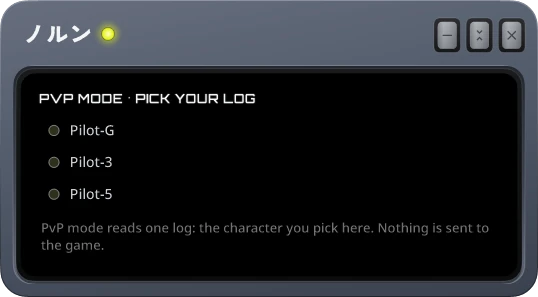
PvP mode asks which character to read: one EVE window, one log1 · PICK YOUR LOG
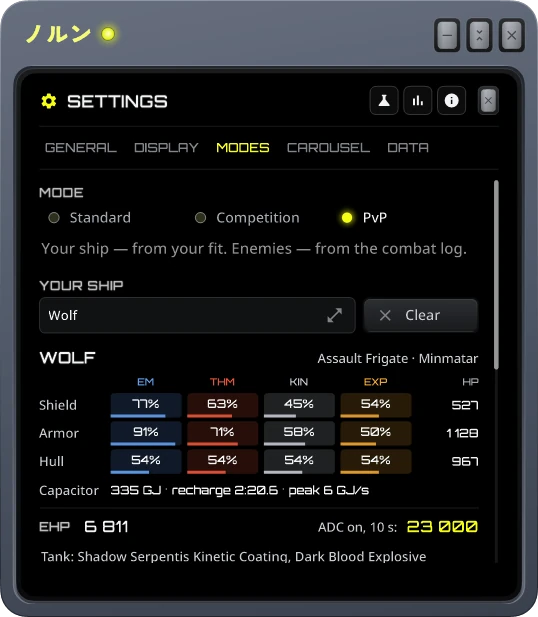
Modes → PvP after a pasted fit: resists, HP, capacitor and EHP of a Wolf2 · PASTE YOUR FIT
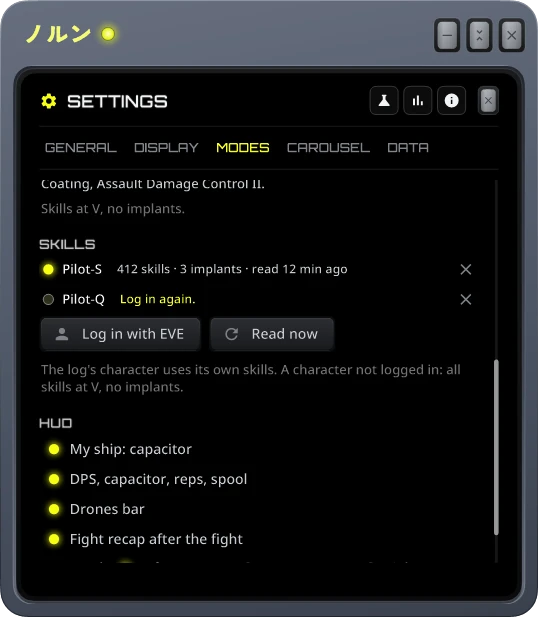
Modes → PvP → Skills: two characters, one logged in, the Log in with EVE key and the HUD switches3 · LOG IN WITH EVE
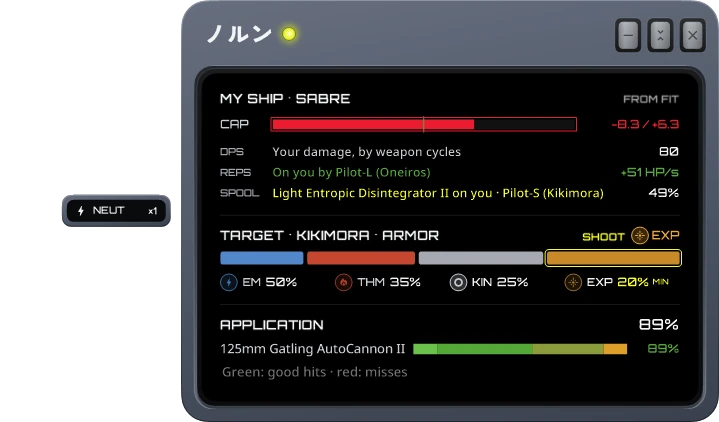
The PvP HUD in a fight, a neut pod beside the hull4 · THE HUD · EWAR PODS
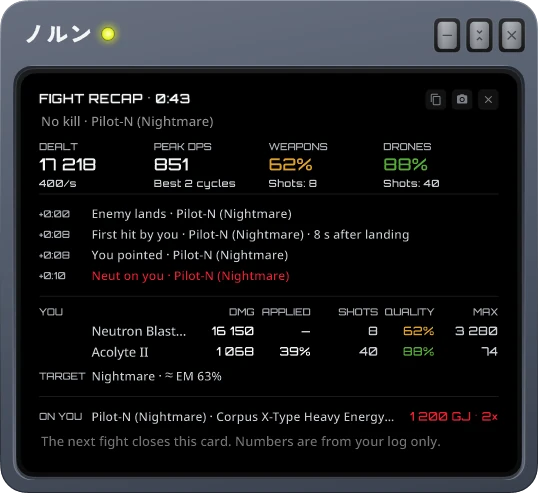
The fight recap card: timeline, table per weapon, neuts on you5 · FIGHT RECAP
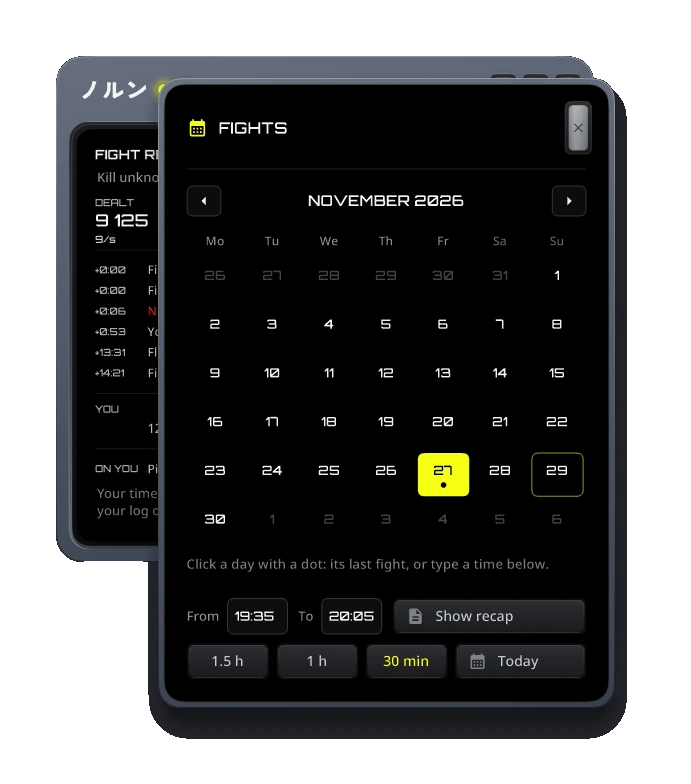
The Fights calendar: a dot on a day with fights, From / To in EVE time, and the 1.5 h, 1 h, 30 min and Today keys6 · PAST FIGHTS
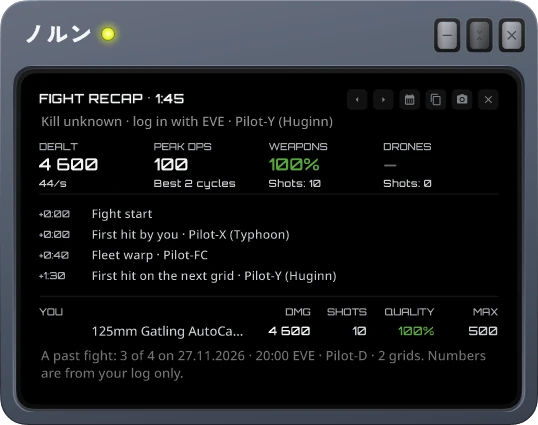
The recap of a past battle: a fleet warp and the first hit on the next grid, 2 grids in one recap7 · A BATTLE OF 2 GRIDS
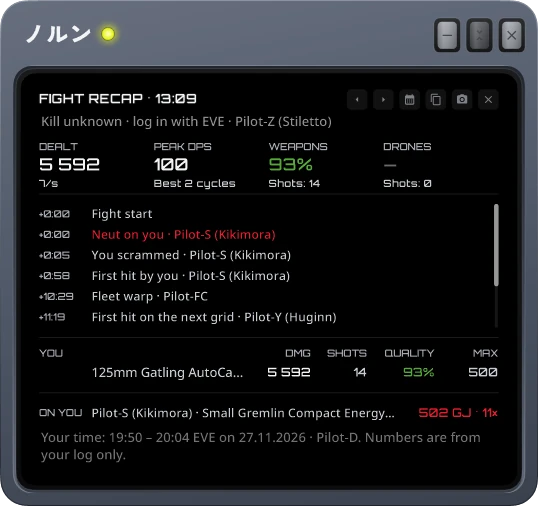
The recap of a typed time span, 19:50 to 20:04 EVE time8 · A TIME YOU TYPE
FIG G.9PVP
START
Settings → Modes → PvP. Then pick your character: one EVE window, one log
YOUR FIT
In the game: Fitting → Export → Copy to clipboard. Paste it in Modes → PvP, from a client in any language. The app shows resists, HP, EHP and capacitor as the Fitting window does. When the ship in the log is not the ship of the fit, MY SHIP says “Not this fit”
MY SHIP · CAP
The enemy's neut pressure on your capacitor (GJ/s) against your fit's peak recharge, and a clear "capacitor empty" line
DPS
Your damage per second by each weapon's own cycle, the reps on you and Triglavian spool-up
TARGET
The ship you shoot, its tank layer and its resists as one bar. SHOOT names the weakest type; a green ring shows when your damage hits it. With a fit, ≈ marks resists worked out from your own hits
APPLICATION
The hit quality of each weapon over the last 20 s, from Wrecks to Misses, green to red. A weapon that stopped dims
DRONES BAR
Your drones and the enemy's: how many hit now and at peak, their hit quality and DPS. A drop means a drone was killed or went out of range
EWAR PODS
A small window beside the hull (left, top or right): disruptors, scramblers, neuts and nosferatu on you, with the pilots
HUD SWITCHES
Modes → PvP → HUD. My ship: capacitor; DPS, capacitor, reps, spool; Drones bar (off by default); Fight recap after the fight. A switch that is off removes its block from the HUD
FIGHT RECAP
A card after the fight: the outcome (from EVE killmails only), damage dealt, peak DPS, hit quality for weapons and drones apart, a timeline from the enemy's landing (fleet warps and gate jumps too; it scrolls with the wheel), a table per weapon with APPLIED, the target's resists and the neuts on you. Keys in the header go to the fight before or after. Every value has a tooltip
FIGHT ENDS
At once at a gate jump or a fleet warp. Else after a quiet time: 30 s, or 3 cycles of your slowest weapon if that is longer. Tackle on the grid keeps a fight going; remote reps, structures, deployables and smartbomb hits on fleet mates do not make a fight. Both values are in Tuning
BATTLE
Fights joined by fleet warps within 300 s are one battle with one recap (“· 2 grids”). A gate jump ends it. The live HUD still shows a recap per grid
PAST FIGHTS
Settings → Modes → PvP: Show last fight recap, and the calendar key. In the calendar a dot marks a day with fights; a click shows its last fight. The bottom row gives the last 1.5 h, 1 h or 30 min, or Today. From / To (hh:mm, EVE time) gives any span up to 6 h. Only your local logs are read
COPY · PICTURE
The copy key puts the recap on the clipboard as text. The camera key saves a picture to Pictures\The Norns
LOG IN WITH EVE
Modes → PvP → Skills. The official EVE login page; read-only access to your skills, your active clone's implants and your killmails. The token stays on your PC, encrypted for your Windows user (DPAPI). Without a login: all skills at V, no implants
KILLS
The game log has no kill line, and the app does not guess one from a wreck shot or a last volley. With a login, the recap shows “Target destroyed · Pilot (Ship)” at the killmail's time. EVE gives killmails up to 5 min late, so the app reads them once a minute for 15 min after the fight. Without a login: “Kill unknown · log in with EVE”. Your own ship destroyed comes from your own killmail, in red with its time
NOT ON THE HUD
Webs, ECM, dampeners, tracking disruptors and target painters: the game log does not record them. The damage you take: a client can filter it out of its log. Other pilots' clients: one log, one character
In the appPvP HUD +EWAR pods +Drones bar +Fight recap +Past fights +Log in with EVE +
GLOSSARY

Words the app, and your FC, use.

Krab, krabbing
Farming ISK from rats. Here: running null-sec anoms with a pack.
Anom, haven
A combat anomaly. Rock and gas havens are this pack's usual sites.
Rats
NPC ships. Their bounties fill the ISK grid.
Thunder pack
EDENCOM gunboats with Vorton projectors: Skybreaker, Stormbringer, Thunderchild.
Anchor
The smartbombing battleship the pack orbits: Nestor, Machariel, Praxis.
Runner
Competition mode: the fast frigate that pulls aggro and carries the lightning.
Arc, chain
A Vorton shot jumping from the first target to the ships around it.
Faction spawn ★
A rare commander battleship with a valuable drop.
Dread, titan spawn
A pirate capital landing in the site: time to decide, or to align out.
Re-warp
A warp with no damage since the last one: not a cleared site.
Point, scram
A warp disruptor or a warp scrambler on you: it stops your warp.
Neut
An energy neutralizer: it drains your capacitor. The HUD shows its pressure in GJ/s.
EFT fit
A ship fit as text. In the game: Fitting → Export → Copy to clipboard.
Applied
Your damage in the log against your weapons' full damage before the target's resists, range and speed.

Ready for your next anom?

Windows 10 / 11 · free · MIT · reads local logs only